FreeUnix.davidleemans.be

WordPress site for Linux and other computernerds

Updated client-side filter plugin for Roundcube Webmail 1.7.x


As a longtime user of a self-hosted Roundcube installation, I was unhappy with the fact that one of my favorite plugins no longer worked with recent versions of Roundcube (1.7.x) and PHP 8.4.x. To make matters worse, the client-side filters plugin I used, seems to be abandonned by the original authors.
This is the plugin: https://github.com/roundcubevnz/roundcube-plugin-filters

So, I took it upon me to update the plugin to make ik compatible again with the latest versions of RoundCube (1.7.x) and PHP 8.4.x. Tbh, I am not much of a PHP-coder, so I relied heavily on the use of Google Gemini to do the heavy lifting for me. It took me several sessions and many hours, providing feedback and pushing Gemini to produce the new code until it finally did what I wanted, without errors.
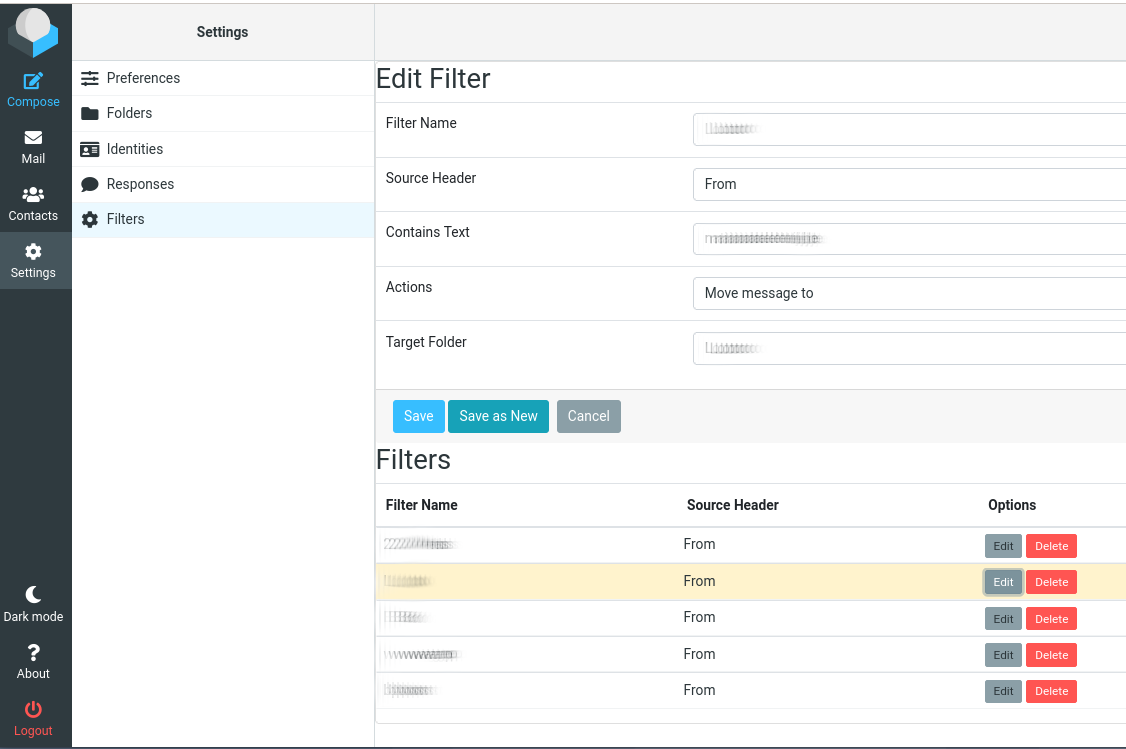
The plugin adds a tab to the Roundcube Settings, allowing you to create filters. The filters can also be edited again, saved or saved as (create copy), and deleted.

If you want to use it, download the zipfile, unzip it in your Roundcube plugins folder, and enable it in the config. You may also need to create the DB-table called filters. You can use the sql file in the zipfile. You most likely also need to change the DB name (USE dbname; ) in the sql file before you run this.
It works fine for me, but as always, YMMV.

Everybody likes screenshots, so this is what it looks like when editing an existing rule:

Shows editing of filter rule.

Filters plugin 2.5


DISCLAIMER: This code is provided ‘as is’ without warranty of any kind. Use at your own risk. The author assumes no responsibility for any damages or data loss.

Downloads:

Enjoy 🙂

Change in site url

The url of this site is now freeunix.davidleemans.be. The old name freeunix.publicvm.com was posing too much problems.

Mostly because the entire publicvm.com domain, owned by DNSEexit.com is often being blacklisted and/or blocked by most ISP’s. This basically rendered the site useless most of the time. I guess that ‘s what you get with these free domain names, so I finally cashed out some money to buy a proper domain name 🙂 .

So please, adjust your bookmarks. If you don’t, you will still be redirected automatically to the new site url, at least for as long as publicvm.com resolves properly.

This post als marks the end for any new Slackware packages, since I no longer use Slackware as a desktop OS. If you must know, I switched to Debian.

Enjoy 🙂

MKVToolNix 71.1.0 for Slackware x64


Latest version of the MKVToolnix package for Slackware (Sbo build), build on a Slackware-current 15.0+ system. Requires Qt5.

 
For Slackware-current x64:

 
You might run into interface issues with this version: the GUI could show partially hidden interface elements, fonts, checkboxes, …
See the next link for more info (GitLab bug report): https://gitlab.com/mbunkus/mkvtoolnix/-/issues/3358

Solution is to create an ENV variable:

QT_AUTO_SCREEN_SCALE_FACTOR=0

Put it somewhere in /etc/bashrc or the user’s .bashrc. That should fix the interface issues.
 
Enjoy 🙂
 

Customize the Default user profile during your Windows 10 OSD


Introdcution

 
In this article, I will show how you can edit the default user profile, as part of your Windows 10 deployment task. There are multiple methods available to edit the default user profile (GPO’s, logon scripts, copy configured profile over the default profile,…), but my preferred method for modifying the default user experience is to edit the default user profile directly using a script that is run during Windows deployment.
This script can also be run on existing machines. This approach can easily be adjusted to your likings, is easy to perform, and does not require lots of preparation.
 
Continue reading

iNove1080 WordPress theme


For those of you who are interested, I am releasing the WP theme that is used for this site. It’s just a slightly tweaked version of the iNove theme, which afaik is now abandoned.  

Modifications I made:

  • It’s wider, the header/footer image are now 1080 pixels wide
  • PRE css now defaults to Courier font, the text is darker, the quote img is removed
  • PRE text now automatically shows scrollbars when text is too wide (overflow = auto)
  • a few tweaks here and there to various spacings to make it fit better

 
Theme was tested on WP 4.6/4.7 on PHP 5.6.x and appears to work just fine.
 
Downloads:


Enjoy 🙂
 

« Older posts