WordPress site for Linux and other computernerds

Category: PHP

Updated client-side filter plugin for Roundcube Webmail 1.7.x


As a longtime user of a self-hosted Roundcube installation, I was unhappy with the fact that one of my favorite plugins no longer worked with recent versions of Roundcube (1.7.x) and PHP 8.4.x. To make matters worse, the client-side filters plugin I used, seems to be abandonned by the original authors.
This is the old plugin: https://github.com/roundcubevnz/roundcube-plugin-filters

So, I took it upon me to update the plugin to make ik compatible again with the latest versions of RoundCube (1.7.x) and PHP 8.4.x. Tbh, I am not much of a PHP-coder, so I relied heavily on the use of Google Gemini to do the heavy lifting for me. It took me several sessions and many hours, providing feedback and pushing Gemini to produce the new code until it finally did what I wanted, without errors.
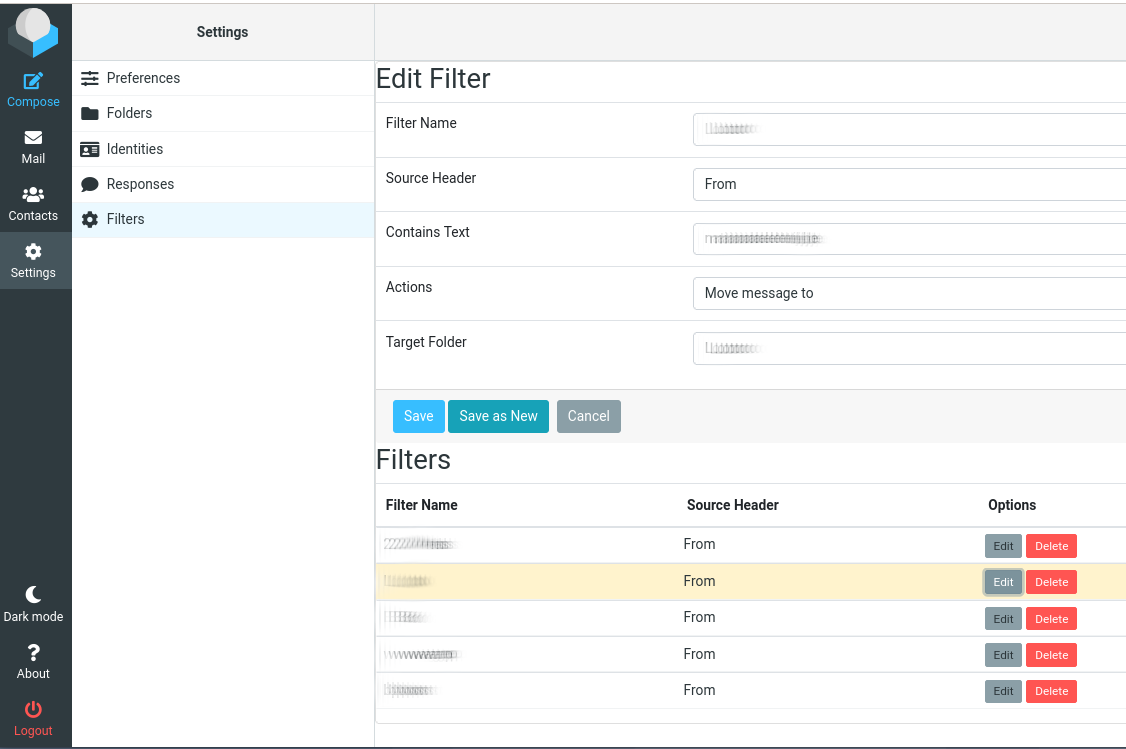
The plugin adds a tab to the Roundcube Settings, allowing you to create filters. The filters can also be edited again, saved or saved as (create copy), and deleted.

If you want to use it, download the zipfile, unzip it in your Roundcube plugins folder, and enable it in the config. You may also need to create the DB-table called filters. You can use the sql file in the zipfile. You most likely also need to change the DB name (USE dbname; ) in the sql file before you run this.
It works fine for me, but as always, YMMV.

Everybody likes screenshots, so this is what it looks like when editing an existing rule (click image for large view):

Shows editing of filter rule.

Filters plugin 2.5


DISCLAIMER: This code is provided ‘as is’ without warranty of any kind. Use at your own risk. The author assumes no responsibility for any damages or data loss.

Downloads:

Enjoy 🙂

Fix the Gallery 2.3.x “This GD version is too old” error

 
For any one out there running Gallery 2.3.x (a web based photo album), this posting gives you a fix for the problem with he GD plugin.
 

The problem


Gallery 2.x is a web based photo album, written in PHP. As such, you can create albums and upload photos into these albums. Gallery then takes care of creating thumbnails and intermediate sized versions of your photos. For this purpose, Gallery needs some graphics toolkit, like GD or NetPBM.
GD is the most widely used toolkit, as it usually comes bundled with PHP. However, Gallery fails to properly detect the version of GD available on the system.

 
The GD config fails with this message:

GD Version: 2.1.0 (bundled) Required:2.0
Failed
This GD version is too old and is not supported by this module! Please upgrade your PHP installation to include the latest GD version.


It seems weird: the GD version bundled with PHP (2.1.0) meets and even exceeds the required version. Yet Gallery fails to properly detect this, and hence refuses to activate the GD plugin.


The solution


In your Gallery installation, make the following change on line 286 from …/modules/gd/classes/GdToolkitHelper.class:

 
Change this:

 if (preg_match('/^>?2\.0/', $gdVersion)) 

into this:

 if (preg_match('/^>?2\.[0-9]/', $gdVersion)) 


So, just change the .0 to .[0-9], and save the file. Afterwards, in Gallery, you can activate the GD plugin, and it should work.